

Optimizing SPA load times with async chunks preloading
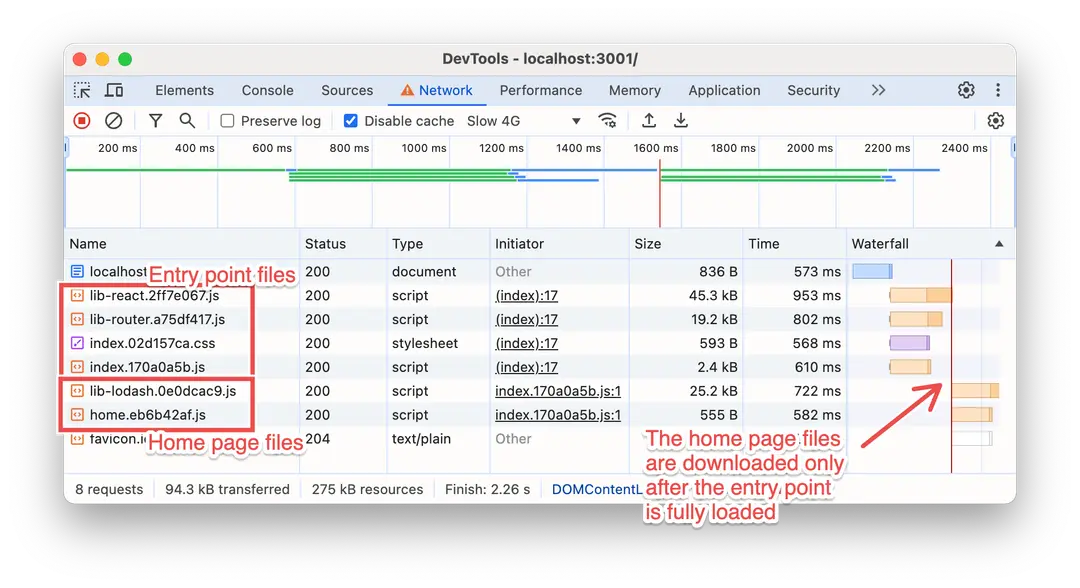
Hello hello! In this post, I’ll explain how to improve the performance of client-side rendered apps by avoiding the waterfall effect caused by route-based lazy-loading. We’ll do this by injecting a custom script that preloads the chunks for the current route, ensuring they’re downloaded in parallel with the entry point chunk. I’ll use Rsbuild for the script injection, but its code can easily be adapted for Webpack and other bundlers as well.
The code snippets are based on a tiny app with just two pages: a home page (that lives under / and /home) and a settings page (that lives under /settings).
Route-based code splitting
In client-side rendered apps, code splitting is one of the main strategies you can use to improve the overall performance. Code splitting enables loading only the necessary code chunks, rather than everything upfront.
The most common way to implement code splitting is by lazy loading route (or page) chunks. This means these chunks are loaded only when the user visits the respective pages, rather than being loaded in advance. This not only reduces the size of the bundle needed to load the app, but also improves caching: the more your app bundle is split into chunks, the less cache invalidation will happen (as long as static files are hashed appropriately).
Server-side rendering frameworks like Next.js and Remix often handle code splitting and lazy loading for you. For client-side rendered single-page applications, you can achieve this by lazy-loading the route components you will use in your router:
const Home = lazy(() => import("./pages/home-page"));const Settings = lazy(() => import("./pages/settings-page"));With this setup, when users land on the / route of your app, only the home page chunk (e.g., home.[hash].js) will be downloaded. The settings page chunk won’t be downloaded until needed (e.g., when you navigate to the settings page).
